I built an AI Email Digest assistant (and learned about leveraging LLMs)
Note: This post and the code referenced within the post is partly AI-generated. I used a custom GPT as my coach to accelerate learning and delivery!
It’s been a while; life has been busy. But I wanted to take the time to document a side project that represents my 2025 learning. Much of this year has been centered around AI, specifically Large Language Models (LLM), which are proving to be a gamechanger, and this post documents my foray into learning how to work with LLMs to learn and deliver.
What am I doing here?
I was looking for a simple but well-scoped use case to use LLMs for. But the goal wasn’t just to produce a thing to help me. It was also a learning project: ship something useful, automate it, iterate on it, and learn how to leverage LLMs throughout that process.
The use case I ended up with here is building an Gmail AI Email Digest: a cron job that
1) pulls all emails since the previous digest (including archived),
2) ranks the most important five (actionable > FYI; legal/government/billing first; social last), and
3) emails the result to me with a concise summary and an appendix of all messages considered.
I’m not always on top of my personal inbox, and if I could use LLMs to triage my incoming emails and pick out the top, say 5, emails that I needed to pay attention to each day, that’s going to deliver signal and reduce noise.
The LLM served as a partner rather than a magic box:
- Drafted the initial script and GitHub Actions workflow from a high-level description.
- Helped me instrument/debug incidents (for example, why a bill wasn’t in the appendix).
- Iterated heuristics (verb-amount proximity, insurance/cap veto,
<ADV>/promo down-rank). - Suggested safer rendering patterns (like coercing non-string fields before
html.escape()).
I still read logs and made decisions, but I moved much faster: I learned just enough Python to glue pieces together and kept momentum focused on shipping and improving the thing I actually use.
What the email digest does (high-level)
This is what the code does:
- Runs daily on GitHub Actions (cron).
- Reads email via the Gmail API (read-only), including archived mail (not just Inbox).
- Skips anything I sent (
-in:sent -from:me). - Extracts a sentence-aware snippet per message (I mask OTP codes and card “last-4”, but keep the email so I still notice important sign-ins).
- Parses potential amounts, then flags actual transaction-like alerts using context (verbs near the amount, issuer cues, and negatives like “insurance cap”).
- Ranks candidates with a JSON-only output (no hallucinated IDs), then emails an HTML + plaintext digest using SMTP.
- Has production-ish guardrails: model fallback & retry/backoff, a kill switch, and an error email.
- Normalizes the model’s output to plain text before rendering to avoid type-related crashes.
You can find the relevant code repo here.
The current set-up looks like this:
- Gmail OAuth (Desktop app creds) → local
token.json→ Base64 → GitHub Secrets → reconstructed in Actions at runtime. - Fetching emails using the Gmail API, not just Inbox—archived messages are in scope too.
- Watermarking: I keep a simple
last_sent_ts.txt. Each run fetches a broad 3-day superset (newer_than:3d in:anywhere -in:spam -in:trash -in:sent -from:me -subject:"AI Email Digest —") and then filters locally by Gmail’s internal timestamp. If the pool is tiny, it falls back to 7 days. - Model call with a JSON-only contract and a fallback list of models.
- Email delivery via Gmail SMTP (app password).
- GitHub Actions: cron in UTC, env secrets, kill switch, and timing logs in SGT + UTC.
Prequel: Creating a custom GPT as my “coach”
But first! In full transparency, at this point of writing, I’m actually not proficient in Python. If you’ve seen my previous posts, I learnt R (though I use way more SQL than R now at my current role) and not Python. But no matter, I created a custom GPT whose job was to be my “AI implementation coach” — exactly the role I needed:
- propose a practical plan (MVP → iterations),
- teach me “just enough” Python + API auth,
- write/modify code on request,
- warn me about privacy and automation pitfalls.
Even the creation of the custom GPT was done with help from ChatGPT. There’s a lot of prompting tips online now (I really like Nate B Jones’s content), and combining that with asking ChatGPT to refine my prompt, it was quite a easy to get to a usable learning coach.
Iterative improvements
Once that custom GPT was up, I worked in small loops: describe the problem, paste errors/output, get a fix or a better approach, repeat.
The feedback/iteration loop was really important. ChatGPT’s code kind of worked… but I had to work with it to troubleshoot a lot of issues along the way. Part of the issues was technical, for example, I was not familiar with Google auth, and I had to regenerate my Google auth token and convert it to base64.
One common class of problems that came up repeatedly is around interpreting numbers, and this is where I had to ask ChatGPT to iterate on the code a lot. In my email digests, I very much want to see emails for transaction alerts or bills, especially if the amount is high so that I can verify it is a transaction or a purchase that I made. But high numbers are also present in promotional emails, or news about prices of stocks/financial assets, and as you’ll see, it seems like it’s not as straightforward to distinguish these from genuine transactions.
Here’s some examples of misinterpretation and a GPT-generated write-up for what the code fix was.
Example 1

Symptom. Phrases like “Deposit insurance up to S$100,000” or retailer “Spend S$200 to get a voucher” triggered large-amount behavior.
Root cause. Amounts without the right verbs (or near coverage/insurance language) are not transactions.
Fixes.
- Verb-amount proximity: require a transaction verb near the amount.
- Coverage/cap veto: if words like “up to / insured / deposit insurance / per depositor / by law” occur around the number, force non-transaction.
- Promo down-rank in ranking (as above) so big numbers don’t crowd out real newsletters when the day is quiet.
Result. Insurance caps and spend-to-earn promos no longer appear as transaction alerts.
Example 2
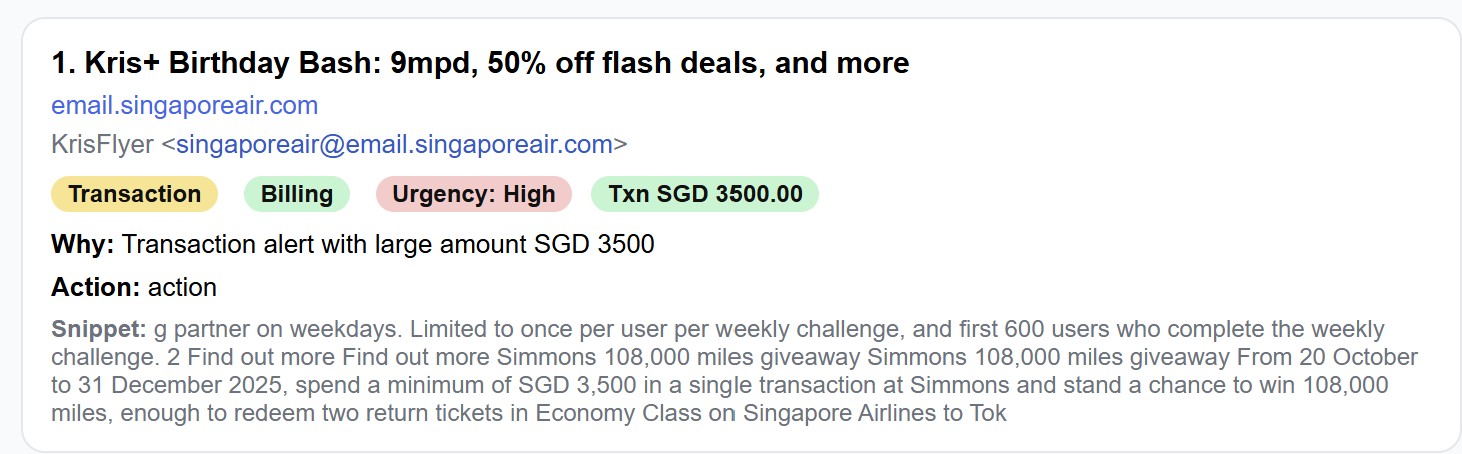
Symptom. A newsletter said “spend a minimum of S$3,500 in a single transaction… stand a chance to win…”. The word “transaction” sat next to “S$3,500”, so the naive rule thought it was a charge alert.
Root cause. Proximity alone isn’t enough. Marketing copy can say “transaction” near big numbers without any money moving.
Fixes.
- Tightened verbs: treat “transaction alert / charged / debited / transfer / credited / …” as signals, but not the bare token “transaction”.
- Promo awareness in ranking: if a subject is
<ADV>or the amount has promo phrasing nearby (e.g., “spend a minimum”, “stand a chance to win”), down-rank and ignore “large amount” as a reason unless it’s a true transaction.
Result. Promos don’t get promoted just because they dangle big numbers.
According to ChatGPT: The improvements that mattered
Here’s a summary of the changes made by ChatGPT on improving the code along the way. This section is entirely written by ChatGPT!
1) Smarter snippets (less chopping, more meaning)
I replaced a fragmenty approach with sentence-aware extraction:
- if there’s a money amount, pull a small window around it so context stays intact,
- otherwise pick the single most action-y sentence (charges, deadlines, currencies),
- trim to about 500 chars.
This gives the model consistent context: “A transaction of SGD 25.76 was made…” rather than a chopped “… 76 was made…”.
2) Financial alerts vs everything else
I added explicit positive and negative cues:
- Positive: “transaction alert”, “charged”, “debited”, “purchase(d)”, “withdrawal”, “transfer(red)”, “authorized/unauthorized”, “declined”, “failed”, “credited”, “you’ve received”.
- Negative: “statement/advice ready”, “balance summary”, “limit”, “price”, “rate”, “promotion”, “sale”, “coupon”.
- Issuer domains (configurable):
uobgroup.com, dbs.com, ocbc.com, citibank.com.sg. - PayNow isn’t special-cased; it only flags if the text actually says a transfer was credited/debited.
3) Categories & ranking you can reason about
- Type: Call to Action vs For Information Only.
- Category: Legal / Government / Billing-Payment / Other.
- Urgency: High / Medium / Low, driven by deadlines and consequences.
- Within Billing/Payment: a simple rule of thumb—transactions ≥ SGD 100 outrank smaller ones unless the smaller one contains fraud signals (declined/failed/unauthorized/suspicious/dispute).
- Appendix: every considered email (sender, subject, timestamp) so I can audit rankings quickly.
4) Robustness in production
- Model fallback & retries with exponential backoff.
- Kill switch via
DISABLE_DIGEST=1(stops cleanly without code edits). - Error emails to myself if the workflow fails.
- GitHub Actions Secrets for everything sensitive (OAuth JSONs are stored Base64-encoded as secrets and reconstructed at runtime).
- Secret scanning & push protection turned on for the public repo.
We haven’t won yet
The classic Stripe slogan of “we haven’t won yet”!
I’ve gotten the email digest to a point where I think it’s decently usable for me. It isn’t always accurate in terms of matching against what I think the top 5 emails should really be, but I think part of that is also the tension between being too prescriptive (e.g. specifying to strictly prioritize some email domains) vs allowing room to flex for new unknown senders.
I also think that on slower days when some of the top 5 emails will be filled by newsletters or promotional emails, I think the digest is still kind of weak there in being able to identify but maybe the impact of a missed email there is not as important anyway?
Anyway, insofar as the objective was to be able to produce something useful while learning how to work with LLMs, I think I’ve certainly managed to achieve that.
If you want to try the digest yourself, the public repo has a step-by-step readme.